Where Winds Meet is one of the most visually impressive free RPGs available on PC right now. It recreates tenth-century China in stunning detail across 20 open world regions and runs a demanding real-time combat engine that pushes your GPU hard. The good news is that you do not need an expensive machine to enjoy it. This guide breaks down the exact hardware you need at every budget level from an entry-level build under $500 to a premium rig that pushes the game to its absolute maximum. Before we get into hardware if you have not yet started playing you can download Where Winds Meet for free on PC here and be in the game within 90 minutes.


Why your PC build matters for Where Winds Meet
A demanding open world engine
Where Winds Meet uses a heavily customized engine that simultaneously renders vast environmental detail, high-resolution character models, dynamic weather, and real-time combat effects. Unlike turn-based RPGs where your GPU only works hard during specific moments, this game taxes your entire system continuously throughout every exploration session. Your CPU handles NPC AI, physics, and network processing while your GPU renders the world and your RAM holds streaming asset data. All three need to be reasonably balanced for the experience to feel smooth.
The RAM requirement of 16GB minimum is higher than many older games and reflects how much data the engine needs to keep accessible for rapid world streaming. Players who try to run the game on 8GB systems report consistent stuttering and asset pop-in that no settings adjustment can fully resolve. 16GB is a genuine floor not a conservative recommendation.
Installing Where Winds Meet on an SSD is the single most impactful hardware decision you can make regardless of your budget tier. The open world streaming performance difference between SSD and HDD is dramatic enough to define whether the game feels smooth or broken during normal exploration.
What frame rate should you target
For Where Winds Meet the ideal target depends on your playstyle. If you play primarily for the story and exploration a stable 60 FPS at medium to high settings is a comfortable and visually impressive experience. If you engage in PvP combat and want the competitive edge that higher frame rates provide then targeting 90 to 120 FPS becomes meaningful. The combat system in this game is fast and responsive and the smoothness difference between 60 FPS and 120 FPS is noticeable during intense fights.
Budget PC build: under $500
Who this build is for
This build targets players who want to run Where Winds Meet at low to medium settings with a stable 45 to 60 FPS in most areas. It uses older generation hardware that delivers solid price-to-performance value and is a realistic starting point for players who do not currently have a gaming PC but want to experience the game without a major financial commitment.
Budget Build
Entry level · Low to medium settings
~$450
Estimated total

| Component | Recommended part | Why this choice |
|---|---|---|
| CPU | AMD Ryzen 5 5600 | 6-core performance well above minimum spec, excellent value |
| GPU | Nvidia GTX 1660 Super | Comfortably above minimum, handles medium settings at 1080p |
| RAM | 16GB DDR4 3200MHz | Exactly the minimum requirement — do not go below this |
| Storage | 500GB NVMe SSD | SSD is essential for smooth world streaming in this game |
| Motherboard | B550 AM4 (any brand) | Supports Ryzen 5000, easy upgrade path later |
| PSU | 550W 80+ Bronze | Sufficient headroom for this component combination |
45–60 FPS · 1080pRecommended settings: Low to Medium · Render Scale 75%
Settings recommendations for the budget build
At this hardware level set your graphics preset to low and manually bump texture quality to medium since the GTX 1660 Super has 6GB VRAM which handles medium textures comfortably. Set render scale to 75 to 80% and shadow quality to low. Disable motion blur, depth of field, and all post-processing effects immediately. With these settings you will hit a consistent 45 to 60 FPS during exploration with occasional dips in the most demanding open world zones with heavy NPC populations.
Mid-range PC build: $700 to $1000
Who this build is for
This is the sweet spot for Where Winds Meet in 2025. A mid-range build in this price range runs the game at high settings with consistent 60 to 90 FPS at 1080p and comfortable performance at 1440p with settings adjustments. This is where the game starts to look the way it was designed to look with detailed environments, sharp character models, and smooth combat at a frame rate that feels genuinely responsive.

Mid-Range Build
The sweet spot · High settings · 1080p to 1440p
~$850
Estimated total
| Component | Recommended part | Why this choice |
|---|---|---|
| CPU | AMD Ryzen 5 7600X | Strong single-core performance handles open world NPC load well |
| GPU | Nvidia RTX 3060 Ti | 8GB VRAM handles high textures, DLSS Quality mode available |
| RAM | 16GB DDR5 5200MHz | Fast RAM reduces CPU bottleneck in dense open world zones |
| Storage | 1TB NVMe SSD Gen 4 | Fast storage eliminates world streaming stutters completely |
| Motherboard | B650 AM5 | AM5 platform supports future Ryzen upgrades through 2026+ |
| PSU | 650W 80+ Gold | Efficient and adequate for this GPU under full load |
65–90 FPS · 1080p–1440pRecommended settings: High · DLSS Quality · Render Scale 90%
Why DLSS makes a huge difference at this tier
The RTX 3060 Ti supports DLSS Quality mode which uses AI upscaling to deliver near-native image quality at a fraction of the GPU cost. Enabling DLSS Quality in Where Winds Meet on this build typically adds 20 to 30 FPS compared to running native resolution with TAA. The image quality difference between DLSS Quality and native TAA is almost invisible in practice while the performance gain is substantial. This is one of the most important settings to activate immediately on any Nvidia RTX card in this generation or newer.
Where Winds Meet is free — your mid-range PC is already ready for it
150+ hours of free Wuxia RPG · Windows PC · No credit card required ⬇ Download Free
High-end PC build: $1500 and above
Who this build is for
A high-end build pushes Where Winds Meet to its absolute visual maximum at 1440p ultra or comfortable 4K performance with DLSS enabled. At this tier you are targeting 90 to 144 FPS at 1440p ultra settings which makes every aspect of the game look and feel exceptional. The combat is silky smooth at high refresh rates and the open world detail at ultra settings genuinely justifies the hardware investment if you play for more than just the gameplay loop.
High-End Build
Maximum performance · Ultra settings · 1440p to 4K
~$1700
Estimated total
| Component | Recommended part | Why this choice |
|---|---|---|
| CPU | AMD Ryzen 7 7800X3D | Best gaming CPU available — eliminates CPU bottleneck entirely |
| GPU | Nvidia RTX 4070 Ti | 12GB VRAM, DLSS 3, handles 1440p ultra and 4K comfortably |
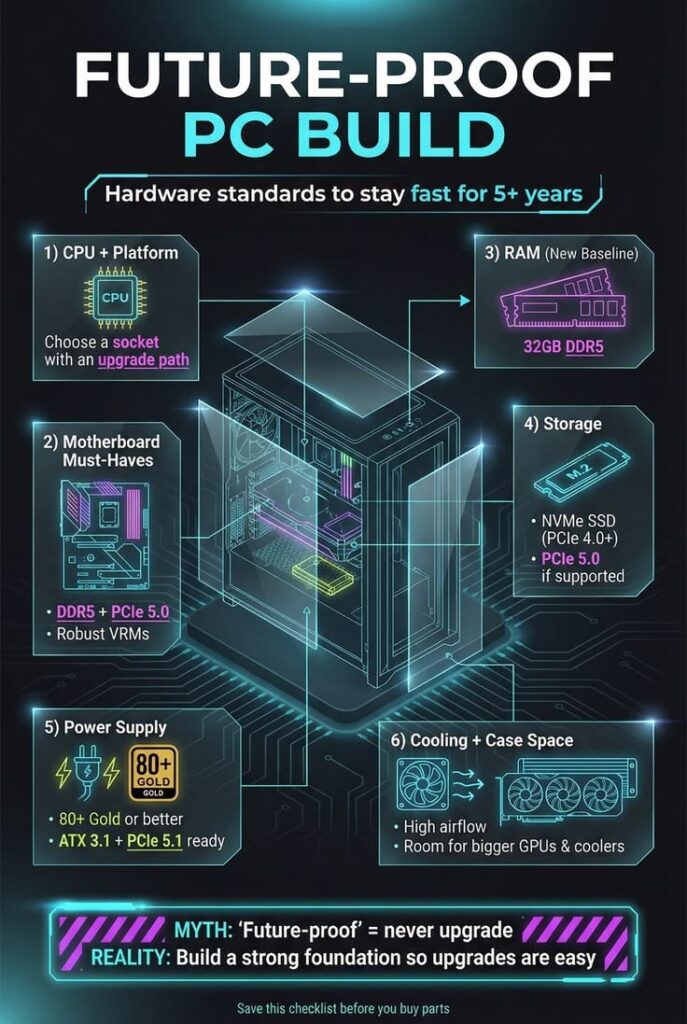
| RAM | 32GB DDR5 6000MHz | Future-proof and eliminates any RAM-related bottleneck |
| Storage | 2TB NVMe SSD Gen 4 | Space for game plus future expansions without management |
| Motherboard | X670E AM5 | Flagship platform, full PCIe 5.0 support for next-gen storage |
| PSU | 850W 80+ Gold | Headroom for GPU peaks and any future GPU upgrade |
90–144 FPS · 1440p UltraRecommended settings: Ultra · DLSS Performance · Render Scale 100%
Is 4K worth it for Where Winds Meet
At 4K Where Winds Meet looks genuinely breathtaking. The environmental art in tenth-century China benefits enormously from the extra pixel density and landscape vistas during exploration look like hand-painted scenes from a historical epic. The RTX 4070 Ti handles 4K with DLSS Performance mode at a stable 60 plus FPS. For players who own a 4K monitor and want to see the game at its absolute best this high-end build delivers that experience comfortably.

Build tier comparison at a glance
| Feature | Budget ~$450 | Mid-range ~$850 | High-end ~$1700 |
|---|---|---|---|
| Target resolution | 1080p | 1080p / 1440p | 1440p / 4K |
| Target FPS | 45–60 | 65–90 | 90–144 |
| Settings preset | Low / Medium | High | Ultra |
| DLSS support | ✗ | ✓ DLSS Quality | ✓ DLSS 3 |
| 4K capable | ✗ | ✗ | ✓ |
| Future-proof (3+ years) | ✗ | Partial | ✓ |
| SSD required | ✓ Essential | ✓ Essential | ✓ Essential |
Key hardware tips that apply to every build
Never skip the SSD requirement
Every build in this guide uses an SSD and that is non-negotiable for Where Winds Meet. The game’s open world asset streaming is genuinely dependent on fast storage. Players who install on an HDD report stuttering and asset pop-in that settings changes cannot fix because the bottleneck is storage speed not GPU or CPU capacity. Even the cheapest SATA SSD is dramatically better than the fastest HDD for this specific game.
RAM speed matters more than you expect
Where Winds Meet’s open world engine feeds a continuous stream of data from storage through RAM to the CPU and GPU. Faster RAM reduces the latency of that pipeline and produces measurable improvements in the smoothness of zone transitions and NPC population loading. For AMD builds in particular running RAM at its rated XMP or EXPO speed in your BIOS is a free performance upgrade that many players never activate. Check your BIOS on first boot and enable XMP or EXPO to ensure your RAM is running at its intended speed.
GPU driver updates before your first session
Both Nvidia and AMD have released game-ready driver updates specifically optimized for Where Winds Meet since its launch. Outdated drivers can cause launch crashes, stuttering, and visual glitches that have nothing to do with your hardware. Update your GPU drivers through GeForce Experience for Nvidia or AMD Software Adrenalin for AMD before your first launch and repeat this check whenever a major update releases for the game.


In-game settings to configure immediately regardless of tier
Three settings should be changed immediately after your first login regardless of which build you are running. First disable motion blur since it hurts combat clarity on every hardware tier. Second disable depth of field since it blurs background detail during exploration for no meaningful visual benefit during gameplay. Third turn V-Sync off and replace it with a manual FPS cap set two or three frames below your monitor’s refresh rate. This eliminates screen tearing without the input lag penalty that V-Sync introduces. For a full settings breakdown that applies to all hardware tiers check our Where Winds Meet PC setup guide which covers every option in detail.
Where Winds Meet delivers a $70-quality RPG experience for free and the hardware requirements scale well across every budget. The budget build under $500 gets you into the game at a playable frame rate. The mid-range build around $850 hits the sweet spot where the game looks and feels its best for most players. The high-end build for $1700 pushes everything to maximum for players who want to see every pixel the game has to offer. Whichever tier fits your budget the most important single upgrade you can make is ensuring your game is installed on an SSD. Start your free Where Winds Meet download here and put your build to the test in tenth-century China today.