choosing your gaming resolution and frame rate is the decision that drives everything else. not what’s available, not what’s impressive on paper, but what you’ll actually enjoy playing on every day.
most gamers skip this step. they see a flashy monitor at 1440p 144Hz and assume that’s their target. they build a system for that monitor without stopping to ask whether those specs match their actual gaming habits. then they’re frustrated when the system costs more than they expected or doesn’t deliver the smooth experience they imagined.
the performance-first approach starts here. you decide your target before touching component specs. a 1080p 100 frames build is completely different from a 1440p 144 frames build, which is completely different from a 4K 60 frames build. each target has optimal hardware combinations that deliver the experience you want efficiently.
understanding this distinction prevents wasted money and ensures you get a system that feels responsive and plays your games smoothly. when you build backwards from your actual performance goal, every component serves that goal. nothing is overkill. nothing is insufficient. when you’re building a gaming pc, this clarity transforms the entire project from guesswork into a logical progression.
for the foundational framework on how all these decisions fit together, review our complete guide to building gaming pcs and understanding performance targets, which covers how resolution, frame rate, budget, and component selection interconnect across different price tiers.
Understanding frame rate and what it actually feels like
Why 60 frames feels different from 100 frames
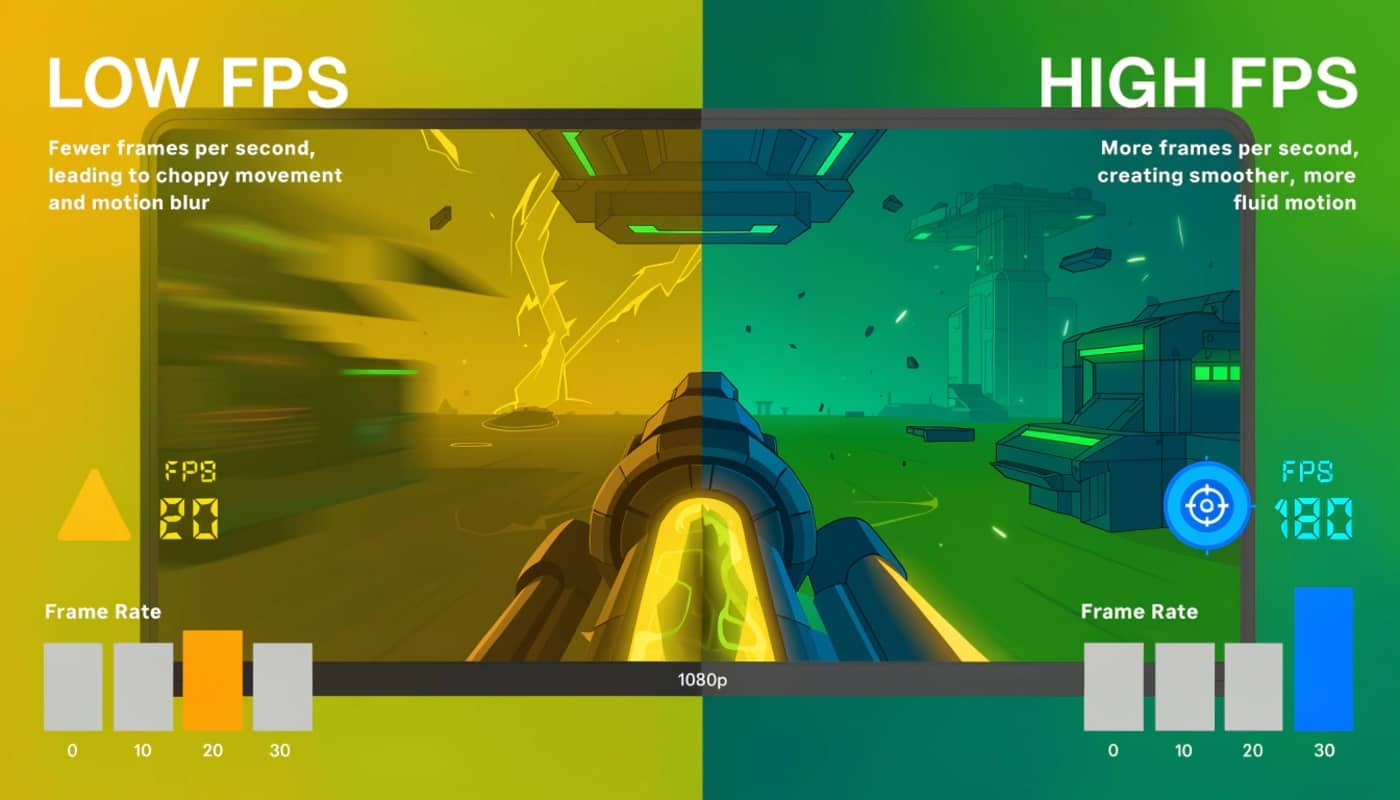
frame rate measures how many images your monitor displays per second. 60 frames means 60 images. 100 frames means 100 images. the difference is immediately noticeable when you’re moving the camera or aiming a weapon.
60 frames per second is the baseline. it’s smooth enough for most single-player games and casual gaming. when you’re playing a story-driven game at a steady pace, 60 fps delivers a cinematic, smooth experience. many players consider 60 frames perfectly acceptable for gaming.
the jump from 60 to 100 frames is noticeable. movement feels snappier. camera pans appear more fluid. your aim in competitive games improves because there’s less visible motion blur. the responsiveness jump is real and meaningful.
the jump from 100 to 144 frames is still noticeable but less dramatic. the experience feels noticeably smoother than 100 frames but not quite as dramatic as the 60-to-100 jump.
the jump from 144 to 165 frames is subtle for most people. the smoothness increases but at a point of diminishing returns.
the jump from 165 to 240 frames is where most people stop noticing the difference unless they’re highly sensitive to responsiveness or play competitive shooters at an advanced level.
input lag complicates frame rate perception. a system running 120 frames with high input lag feels less responsive than one running 100 frames with low input lag. frame rate isn’t the only metric that matters. consistency matters too.
a system averaging 100 frames but dropping to 60 frames periodically feels worse than a system maintaining 80 frames steadily. frame time consistency determines how smooth the experience actually feels.
competitive gaming benefits dramatically from high frame rates. in valorant, counter-strike 2, or overwatch 2, the difference between 100 and 240 frames is the difference between competitive disadvantage and advantage. your crosshair tracks more smoothly. your reaction time feels tighter. your aim improves.
single-player games benefit less from extreme frame rates. a story-driven game at 80 frames feels smooth and cinematic. jumping to 120 frames adds smoothness but doesn’t transform the experience. the visual presentation matters more than frame rate in single-player scenarios.
Resolution and visual clarity
1080p Versus 1440p Versus 4K
resolution measures pixel count on screen. 1080p means 1920 by 1080 pixels. 1440p means 2560 by 1440 pixels. 4K means 3840 by 2160 pixels.
higher resolution means more pixels, which means sharper visuals. the difference between 1080p and 1440p is noticeable on anything larger than 24 inches. individual pixels become visible on 27-inch 1080p monitors. text looks jagged. small details lose crispness.
1440p is the sweet spot for most gamers. it’s sharp enough on 27-inch monitors. it’s not so demanding that you need expensive hardware. it’s the resolution where visual clarity and performance balance reasonably.
4K is stunning visually. details are crisp. distant objects render clearly. the cinematic experience is excellent. the cost is high. 4K requires an expensive gpu to maintain playable frame rates. a $1500 gpu might barely maintain 60 frames at 4K ultra settings in demanding games.
monitor size affects how noticeable resolution is. on a 24-inch 1080p monitor, pixels are small enough that individual pixels aren’t obvious unless you look closely. on a 27-inch 1080p monitor, you notice pixelation immediately. on a 32-inch 1080p monitor, it looks noticeably blurry.
gaming distance matters too. if you sit 2 feet from a 27-inch monitor, you notice individual pixels more than if you sit 3 feet away. closer viewing distances amplify the difference between 1080p and 1440p.
competitive gamers often prefer 1080p on smaller monitors like 24-inch 1080p 240Hz displays. the high frame rate and small screen make resolution less important than responsiveness.
visual-focused gamers often prefer 1440p or 4K on larger monitors. the clarity and detail matter more than maximum frame rates.
matching your display to your performance target
The display determines your ceiling
your monitor is your hardware ceiling. you cannot display more frame rates than your monitor supports. a 60Hz monitor cannot show 100 frames. a 100Hz monitor cannot show 240 frames.
building a system that outputs 200 frames for a 60Hz monitor wastes gpu performance. that performance headroom does nothing for you.
conversely, a system that outputs 80 frames for a 144Hz monitor leaves the monitor underutilized. you’re not getting the full value from your display.
the goal is matching your system output to your display refresh rate or slightly exceeding it for headroom.
a 1080p 60Hz monitor pairs well with a system targeting 60-75 frames at high settings. an rtx 4060 or rtx 4070 works well.
a 1440p 100Hz monitor pairs well with a system targeting 100-120 frames at high settings. an rtx 4070 or rtx 4080 is appropriate.
a 1440p 144Hz monitor pairs well with a system targeting 120-144 frames at high settings. an rtx 4070 super or rtx 4080 makes sense.
a 1080p 240Hz monitor pairs well with a competitive gamer’s system. frame rate matters more than visual fidelity. an rtx 4070 easily exceeds 240 frames at 1080p competitive settings.
a 4K 60Hz monitor pairs well with a system targeting 4K at 60 frames. an rtx 4080 or rtx 4090 is necessary.
matching display to system ensures you get value from both investments. mismatching wastes money on either an overpowered system for a weak display or an underpowered system struggling to drive a good display.
Gaming genre affects your performance priority
Competitive gaming versus single-player gaming
competitive games like valorant, counter-strike 2, and overwatch 2 benefit from high frame rates and low latency. you want as many frames as your monitor can display. input responsiveness matters more than visual fidelity.
in valorant at 1080p, you can run 200+ frames on high settings with a mid-range gpu. the high frame rate makes your aim smoother and your reactions feel tighter.
in counter-strike 2, frame rate consistency matters heavily. competitive players often lock fps at their monitor refresh rate rather than letting it fluctuate.
single-player games like baldur’s gate 3, starfield, and elden ring benefit more from high settings and visual quality than extreme frame rates. a stable 60-80 frames with high graphics settings creates a better experience than 100 frames on low settings.
in baldur’s gate 3, the difference between medium and high settings is more impactful than the difference between 80 and 120 frames. you’re looking at the game world. frame rate matters less than visual presentation.
mmo games fall somewhere in between. games like final fantasy 14 run smoothly at 60-100 frames with good settings. responsiveness matters for pvp but not to the extreme degree of true competitive shooters.
strategy games like starcraft or total war benefit from consistent frame rates more than absolute frame rate peaks. a steady 60 frames is better than fluctuating between 80 and 100.
your game library should guide your performance target. if you play mostly competitive shooters, prioritize frame rate and responsiveness. if you play mostly story games, prioritize resolution and visual quality.
Budget constraints and performance targets
The reality of what different budgets deliver
your budget is finite. that budget determines what performance target is realistic.
a $700 system targets 1080p gaming at 60-75 frames or 1440p at 40-50 frames. expect high settings in most games, not ultra settings.
a $1200 system targets 1440p gaming at 100-120 frames or 1080p at 100+ frames. high settings are realistic. ultra settings depend on the specific game.
a $1800 system targets 1440p gaming at 120-144 frames or 4K at 40-50 frames. high to ultra settings are standard.
a $2500+ system targets 4K at 60+ frames or 1440p at 144+ frames at ultra settings. this is where you stop compromising.
matching your target to your budget prevents disappointment. a $700 budget cannot deliver 1440p 144 frames. expecting that leads to frustration when the system underperforms relative to the expectation.
being realistic about budget means you get a system that actually meets expectations rather than consistently falls short.
Identifying your actual gaming needs
What you actually play versus what you think you’ll play
most gamers overestimate their performance needs. they imagine playing the latest aaa titles at maximum settings. in reality, they play competitive games at 1080p or replay older games they enjoy.
honest assessment prevents wasted money. if you play valorant 80 percent of the time, you don’t need a $2000 gpu for 4K capability. you need a solid mid-range system that delivers 200+ frames at 1080p.
if you play baldur’s gate 3 and story games 80 percent of the time, you need good gpu power for visual quality but don’t need extreme frame rates.
track your actual game library. not the games you aspire to play, but the games you actually load and play regularly.
Setting your performance target
The decision framework
step 1: determine your monitor. what resolution and refresh rate do you have or plan to buy.
step 2: define your primary game. what game do you play most. is it competitive or single-player focused.
step 3: decide your target frame rate. for competitive games, aim for your monitor’s refresh rate or higher. for single-player games, 60 frames is sufficient but 80+ is more comfortable.
step 4: decide your target resolution. are you playing at your monitor’s native resolution or lower.
step 5: assess your budget. be realistic about what you can spend.
step 6: research component combinations that achieve your target. what gpu and cpu combination delivers your specific target.
this framework converts abstract performance ideas into concrete targets that guide component selection.
a clear target means every purchase serves that target. nothing is overkill. nothing is insufficient.
your gaming performance target is the foundation of every intelligent pc build. starting here rather than jumping to component specs ensures you build a system that actually delivers the experience you want.
choosing between 1080p 60 frames, 1440p 100 frames, and 4K 60 frames are fundamentally different purchasing decisions. each leads to different component selections, different price points, and different real-world gaming experiences.
be honest about your gaming habits, your budget constraints, and your performance expectations. that honesty prevents wasted money and ensures satisfaction with your final system.
when you match hardware to your actual performance target, the entire build process becomes logical and straightforward. components aren’t chosen because they’re trendy or impressive. they’re chosen because they deliver your specific performance goal efficiently.