Ray tracing represents the biggest graphical advancement in gaming since the introduction of 3D acceleration. This rendering technique simulates how light actually behaves in the real world, bouncing between surfaces to create photorealistic lighting, shadows, and reflections. However, ray tracing remains extremely demanding on hardware, requiring careful configuration to balance visual improvements with playable frame rates. Understanding which ray tracing features provide the most visual impact and how to optimize them for your specific hardware determines whether you’ll enjoy this cutting-edge technology or watch your frame rates collapse. This guide explores ray tracing configuration from basic setup through advanced optimization, helping you achieve the best possible balance between realism and performance.
Understanding ray tracing technology
Ray tracing calculates lighting by simulating individual light rays as they travel through a scene. Unlike traditional rasterization which approximates lighting through mathematical shortcuts, ray tracing physically models how photons interact with surfaces, creating lighting that matches real-world physics.
Real-time ray tracing in games uses hybrid approaches combining ray tracing with traditional rasterization. Games typically ray trace specific effects like reflections or shadows while using rasterization for primary geometry rendering. This hybrid approach makes ray tracing viable for interactive frame rates, though still demanding on hardware.
Hardware acceleration through dedicated RT cores on NVIDIA RTX cards and ray accelerators on AMD RDNA 2 and 3 cards makes real-time ray tracing possible. These specialized processors handle the complex intersection calculations ray tracing requires. Without hardware acceleration, ray tracing runs too slowly for gaming even on powerful CPUs.
Ray count and bounce depth determine ray tracing quality and performance cost. Each pixel might cast one ray for reflections or dozens for global illumination. Rays can bounce once or multiple times to simulate indirect lighting. More rays and bounces create more accurate results but multiply computational costs exponentially.
Denoising algorithms clean up the noisy image ray tracing produces when using limited ray counts. Games can’t cast enough rays per pixel for clean results at real-time frame rates, so AI-powered denoising reconstructs clean images from sparse ray-traced data. NVIDIA’s DLSS ray reconstruction specifically targets ray-traced rendering.
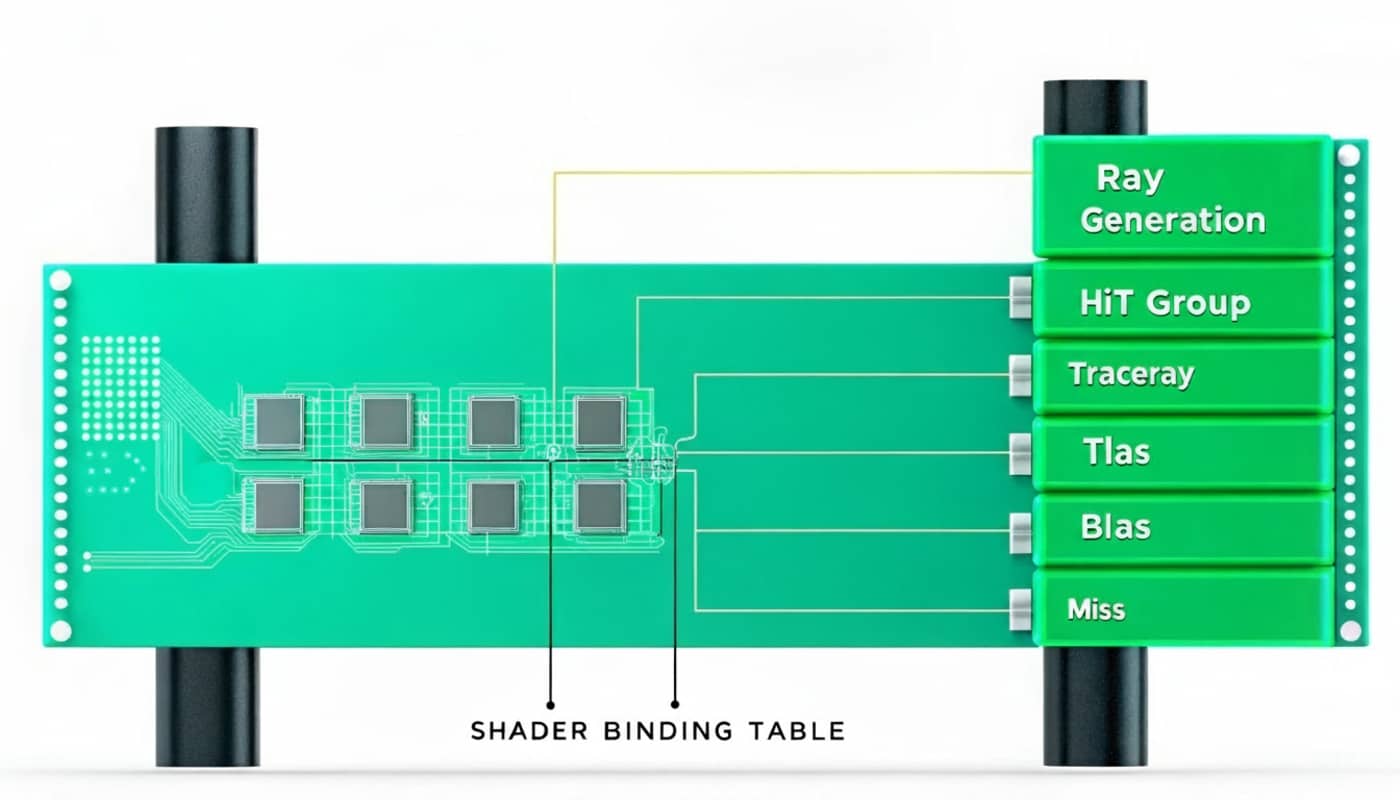
BVH acceleration structures organize scene geometry to speed up ray intersection tests. Building and updating these structures requires memory and processing time. Dynamic scenes with moving objects require BVH updates every frame, adding overhead beyond the actual ray tracing calculations.
Hardware requirements and capabilities
Ray tracing performance varies dramatically across GPU generations and models. Understanding your hardware’s capabilities sets realistic expectations for which ray tracing features you can enable.
NVIDIA RTX 2000 series introduced consumer ray tracing with first-generation RT cores. These cards handle basic ray tracing at 1080p with significant performance impact. The RTX 2060 and 2060 Super struggle with ray tracing beyond minimal settings, while the RTX 2080 and 2080 Ti handle medium ray tracing at 1440p with upscaling assistance.
NVIDIA RTX 3000 series improved ray tracing performance substantially with second-generation RT cores. The RTX 3060 Ti and 3070 handle ray tracing at 1440p with DLSS. The RTX 3080 and 3090 manage ray tracing at 4K with upscaling. These cards make ray tracing viable for mainstream gaming rather than just enthusiast showcases.
NVIDIA RTX 4000 series features third-generation RT cores with further performance improvements. The RTX 4070 handles ray tracing that challenged the RTX 3080. The RTX 4080 and 4090 enable aggressive ray tracing even at 4K. Frame generation through DLSS 3 further improves perceived performance on these cards.
AMD RDNA 2 cards including RX 6000 series introduced ray tracing to AMD GPUs. Performance trails equivalent NVIDIA cards by 20-40% in ray-traced workloads. The RX 6800 XT matches RTX 3070 ray tracing performance roughly. AMD cards benefit more from FSR upscaling when enabling ray tracing due to the greater performance hit.
AMD RDNA 3 cards like RX 7900 XT and 7900 XTX improved ray tracing performance but still lag behind equivalent NVIDIA offerings. The architectural focus on rasterization performance means AMD cards excel without ray tracing but struggle to maintain parity when ray tracing is enabled heavily.
Intel Arc GPUs feature ray tracing support with performance varying by model. The Arc A770 and A750 handle ray tracing reasonably well, especially with XeSS upscaling. However, driver maturity and game optimization remain concerns, making Intel cards less reliable choices specifically for ray tracing workloads.
Ray tracing quality settings explained
Games implement ray tracing through various effects, each with distinct visual characteristics and performance costs. Understanding these helps prioritize which to enable.
Ray-traced global illumination simulates indirect lighting bouncing through environments. This creates realistic color bleeding where red walls cast reddish light on nearby surfaces. Global illumination provides the most transformative visual improvement among ray tracing features. However, it also costs the most performance, typically 40-60% frame rate reduction on high settings.
Ray-traced reflections calculate accurate mirror-like surfaces on water, glass, metal, and other reflective materials. Unlike screen-space reflections which only reflect visible objects, ray-traced reflections show accurate mirrors of the environment. The visual improvement is substantial in games with prominent reflective surfaces but negligible in games without many reflective materials.
Ray-traced shadows produce physically accurate shadows with realistic soft penumbras based on light source size and distance. Traditional shadow mapping creates hard-edged or artificially softened shadows. Ray-traced shadows look more natural but cost 20-40% performance depending on implementation and quality settings.
Ray-traced ambient occlusion enhances contact shadows in corners and crevices where ambient light would naturally be blocked. This adds subtle depth that makes scenes feel more three-dimensional. However, traditional SSAO and HBAO techniques provide similar results at much lower cost, making ray-traced ambient occlusion a luxury rather than priority.
Ray-traced caustics simulate complex light patterns created by light passing through or reflecting off curved transparent surfaces. Water caustics dancing on underwater surfaces or light patterns through glass represent caustics. Few games implement ray-traced caustics due to extreme computational cost for relatively minor visual enhancement.
Path tracing represents the ultimate ray tracing implementation, simulating all lighting through ray tracing with no rasterization shortcuts. Games like Cyberpunk 2077 and Portal RTX offer path tracing modes that look photorealistic but require RTX 4080 or higher even at 1080p with maximum upscaling and frame generation.
Enabling ray tracing in games
Activating ray tracing requires proper configuration in both games and GPU control panels to ensure features work correctly and perform optimally.
In-game ray tracing toggles vary by title. Some games offer simple on/off switches while others provide granular control over individual ray-traced effects. Navigate to graphics settings and look for ray tracing, RTX, or DXR options. Modern games typically place ray tracing settings in advanced or separate ray tracing submenus.
DirectX Raytracing or DXR support is required for ray tracing on Windows. Ensure your GPU drivers support DXR and that Windows 10 version 1809 or newer is installed. Most games automatically detect DXR capability, but some require manually enabling it through configuration files or startup parameters.
Vulkan ray tracing extensions provide ray tracing support in games using Vulkan API rather than DirectX. Games like DOOM Eternal and Quake II RTX use Vulkan ray tracing. AMD and Intel cards sometimes perform better with Vulkan ray tracing than DXR, making API selection relevant when games support both.
Driver updates specifically target ray tracing performance in new game releases. Both NVIDIA and AMD release game-ready drivers timed with major game launches that include ray tracing. Always update to the latest drivers before enabling ray tracing in newly released titles.
NVIDIA control panel settings affect ray tracing behavior globally. Under manage 3D settings, ensure that ray tracing is not globally disabled. Some overcautious power-saving profiles disable ray tracing by default. Verify that ray tracing support shows as enabled for maximum compatibility.
Upscaling integration with ray tracing
Ray tracing’s performance cost makes upscaling technologies essential rather than optional. Combining ray tracing with upscaling delivers both visual quality and playable frame rates.
DLSS quality mode with ray tracing provides the best balance for most scenarios. This renders at approximately 67% of native resolution while using AI reconstruction to produce near-native image quality. Frame rates typically improve 40-50% compared to native resolution ray tracing, making the combination viable on RTX 3060 Ti and higher.
DLSS performance mode renders at 50% native resolution for greater performance gains when quality mode doesn’t reach target frame rates. Image quality degrades compared to quality mode but remains acceptable, especially at 1440p and 4K where higher base resolutions compensate. Use performance mode with demanding ray tracing in games like Cyberpunk 2077.
DLSS ray reconstruction specifically targets ray-traced rendering by applying AI denoising to sparse ray-traced data. This relatively new feature in DLSS 3.5 improves ray tracing quality without additional performance cost. Enable ray reconstruction when available for cleaner reflections and lighting with the same frame rates.
FSR quality mode provides similar upscaling benefits to DLSS on AMD cards and older NVIDIA GPUs. FSR 2 and newer deliver temporal reconstruction quality approaching DLSS. The performance gains match DLSS roughly, making FSR essential for ray tracing on hardware without DLSS support. Always enable FSR when using ray tracing on non-RTX cards.
XeSS on Intel Arc GPUs delivers ray tracing performance improvements similar to DLSS when using the XMX-accelerated path. On Arc A770 and A750, XeSS quality mode recovers much of ray tracing’s performance cost. The technology works adequately on competing GPUs through DP4a fallback but performs best on Intel hardware.
Native resolution ray tracing should only be attempted on RTX 4080 or higher GPUs. Even these powerful cards struggle to maintain 60 FPS in demanding ray-traced games at native 4K. Reserve native resolution for less demanding titles or when taking screenshots rather than active gameplay.
Optimizing ray tracing performance
Maximizing ray tracing performance requires understanding which settings provide visual impact worth their cost and which can be reduced without significant quality loss.
Ray tracing quality levels within games control ray count, bounce depth, and resolution of ray-traced effects. Low ray tracing uses fewer rays and bounces, improving performance by 40-60% compared to ultra while maintaining much of the visual benefit. Medium ray tracing represents the optimal balance for most RTX 3000 and 4000 series cards.
Selective ray tracing enables only specific effects rather than all available features. In Cyberpunk 2077, you might enable ray-traced lighting and reflections while disabling ray-traced shadows. Experiment with combinations to find which effects enhance your experience most. Lighting typically provides the biggest visual impact per performance cost.
Hybrid rendering approaches use ray tracing for features where it excels while using rasterization for effects where traditional techniques suffice. Enable ray-traced lighting and reflections but use traditional shadow mapping. This maintains much of ray tracing’s visual benefit while recovering substantial performance.
Ray tracing resolution scaling in some games controls the internal resolution of ray-traced effects separately from main rendering resolution. Reducing ray tracing resolution to 75-80% of main resolution improves performance 15-25% with minimal visible degradation. The upscaling and denoising processes mask the lower ray tracing resolution effectively.
Reflection and shadow distance limits control how far from the camera ray tracing applies. Reducing ray-traced reflection distance saves performance since distant reflections are less noticeable during gameplay. Similarly, limiting ray-traced shadow distance maintains nearby shadow quality while using cheaper techniques at distance.
Frame generation through DLSS 3 on RTX 4000 series cards effectively doubles frame rates in ray-traced games. However, it adds latency, making it better suited for single-player experiences than competitive multiplayer. Use frame generation alongside ray tracing for cinematic games where input lag matters less than visual quality.
Game-specific ray tracing configurations
Different games implement ray tracing with varying performance characteristics requiring tailored optimization approaches.
Cyberpunk 2077 features the most comprehensive ray tracing implementation in any game. The title offers ray-traced lighting, shadows, reflections, and full path tracing mode. For RTX 3070 and 3080 cards, enable ray-traced lighting on medium with DLSS quality mode. For RTX 4080 and higher, medium path tracing with DLSS balanced mode provides stunning visuals at 60+ FPS.
Control showcases ray-traced reflections and debris extensively. The game’s brutalist architecture features many reflective surfaces where ray tracing shines. Enable ray-traced reflections and transparent reflections on medium to high with DLSS quality mode. The game runs well with ray tracing even on RTX 2070 Super and newer cards.
Metro Exodus Enhanced Edition requires ray tracing and eliminates traditional lighting entirely. The game uses global illumination exclusively through ray tracing. Set global illumination quality to high rather than ultra for the best balance. DLSS quality mode makes the game playable on RTX 2060 Super and newer at 1080p.
Minecraft with RTX implements full path tracing, making even simple block geometry look photorealistic through accurate lighting. The game requires DLSS even on RTX 4090 at 4K. Use DLSS quality mode at 1440p on RTX 3070 and higher. The dramatic visual transformation justifies the performance cost in this specific title.
Spider-Man games on PC feature comprehensive ray-traced reflections that showcase New York’s architecture. Enable ray-traced reflections on medium or high with DLSS quality mode. The swinging mechanics benefit from accurate reflections in windows. RTX 3060 Ti and higher handle ray tracing well at 1440p.
Portal RTX represents full path tracing retrofit of a classic game. The remaster requires RTX hardware and uses path tracing for all lighting. Even RTX 4080 requires DLSS performance mode for 60 FPS at 1440p. The visual transformation demonstrates what’s possible with unlimited ray tracing but isn’t representative of typical game implementations.
Ray tracing artifacts and troubleshooting
Ray tracing introduces new types of visual artifacts requiring specific solutions. Understanding common issues helps maintain image quality while using ray traced features.
Noisy reflections and lighting occur when too few rays sample each pixel. Increasing ray tracing quality reduces noise but costs performance. Alternatively, ensuring denoising is enabled and functioning properly cleans up noise without additional ray tracing cost. Most modern games handle denoising automatically through DLSS or in-engine solutions.
Ghosting in ray-traced reflections happens when temporal accumulation struggles with fast motion. This appears as trailing artifacts behind moving objects in reflections. Reducing ray tracing quality paradoxically can reduce ghosting since it relies less on temporal data. DLSS ray reconstruction specifically addresses this artifact.
Light leaking through thin geometry represents a common ray tracing limitation. Rays sometimes pass through walls that lack proper collision meshes or have gaps in geometry. This isn’t fixable through settings and represents developer implementation issues. Expect some light leaking in most ray-traced games.
Performance stuttering during ray tracing can result from BVH acceleration structure updates. Games with many moving objects require constant BVH rebuilding. Reducing object count through settings like population density or particle effects helps. Ensure games install on SSDs to minimize streaming-related stuttering.
Black screens or crashes when enabling ray tracing indicate driver issues or insufficient VRAM. Update to latest GPU drivers first. If problems persist, reduce texture quality to free VRAM for ray tracing acceleration structures. Games like Cyberpunk 2077 with path tracing require 10GB+ VRAM even with DLSS.
Driver timeouts occur when ray tracing calculations take too long, causing Windows to reset the GPU driver. This happens with extreme ray tracing settings on marginal hardware. Reduce ray tracing quality or resolution to prevent timeout errors. Increasing Windows TDR timeout through registry edits provides workaround but doesn’t address the underlying performance issue.
Ray tracing for content creation
Ray tracing benefits extend beyond gaming to content creation where accurate lighting matters for professional results.
Screenshot mode with maximum ray tracing creates photorealistic images worth sharing. Most games with ray tracing include photo modes. Enable highest ray tracing settings, disable HUD elements, and use photo mode camera controls for composition. Frame rates become irrelevant when capturing single frames.
Video recording with ray tracing requires more powerful hardware than gameplay alone. Recording software adds overhead on top of ray tracing’s cost. Use DLSS performance mode and reduce ray tracing to medium quality for smoother recording. Hardware encoding through NVIDIA NVENC minimizes recording performance impact.
Streaming ray-traced gameplay demands similar compromises. The stream encoding adds significant GPU load competing with ray tracing. Use NVENC encoding to leverage dedicated hardware. Reduce ray tracing quality and resolution to maintain acceptable frame rates while streaming.
Benchmarking ray tracing performance helps evaluate hardware capabilities objectively. Use built-in benchmarks when available, running them multiple times and averaging results. Third-party tools like 3DMark Port Royal provide standardized ray tracing tests for comparing systems and configurations.
Future of ray tracing technology
Ray tracing continues evolving rapidly with new hardware generations and software techniques. Understanding the trajectory helps plan upgrades and set expectations.
Next-generation consoles from Sony and Microsoft include ray tracing hardware, ensuring future games implement the technology as standard rather than optional PC enhancement. This will drive optimization improvements and wider adoption across game releases.
Machine learning denoising continues improving through each DLSS iteration. Future versions will produce cleaner results from fewer rays, reducing ray tracing’s performance cost. AMD and Intel are developing competing ML denoising solutions that will similarly improve ray tracing viability.
Mesh shaders and primitive shaders optimize geometry processing, freeing GPU resources for ray tracing. These new graphics pipeline features reduce CPU overhead for draw calls, shifting bottlenecks and enabling higher ray tracing quality without proportional performance cost.
ReSTIR and other research techniques promise better ray tracing efficiency through improved sampling algorithms. These methods produce cleaner lighting from dramatically fewer rays. Implementation in consumer games remains years away but represents the future of practical real-time ray tracing.
Conclusion
Ray tracing setup requires balancing visual improvements against substantial performance costs. Start by enabling ray tracing with upscaling technology like DLSS or FSR to maintain playable frame rates. Prioritize ray-traced lighting and global illumination over shadows and ambient occlusion for the best visual return per performance investment.
Hardware capabilities determine how aggressively you can enable ray tracing. RTX 2000 series and AMD RDNA 2 cards handle basic ray tracing at 1080p. RTX 3000 series enables medium ray tracing at 1440p. RTX 4000 series manages aggressive ray tracing at 4K. Match your settings to your hardware for optimal results.
Game-specific optimization proves essential since ray tracing implementations vary dramatically between titles. Some games implement ray tracing efficiently while others tank performance for minimal visual gain. Research settings guides for specific games and experiment with selective ray tracing to find combinations that enhance your experience.
Regular driver updates improve ray tracing performance and stability. Both NVIDIA and AMD optimize drivers for new ray-traced releases. Update drivers before enabling ray tracing in newly released games to ensure best compatibility and performance.
Ray tracing represents gaming’s future even as current implementations remain demanding. As hardware improves and software optimizations advance, ray tracing will become standard rather than luxury feature. Understanding how to configure it now prepares you for the fully ray-traced games coming in future years.
Claude est une IA et peut faire des erreurs.
Veuillez vérifier les réponses.
Sonnet 4.5
Claude est une IA et peut faire des erreurs. Veuillez vérifier les réponses.Ray Tracing Setup: Complete Configuration Guide
Ray tracing represents the biggest graphical advancement in gaming since the introduction of 3D acceleration. This rendering technique simulates how light actually behaves in the real world, bouncing between surfaces to create photorealistic lighting, shadows, and reflections. However, ray tracing remains extremely demanding on hardware, requiring careful configuration to balance visual improvements with playable frame rates. Understanding which ray tracing features provide the most visual impact and how to optimize them for your specific hardware determines whether you’ll enjoy this cutting-edge technology or watch your frame rates collapse. This guide explores ray tracing configuration from basic setup through advanced optimization, helping you achieve the best possible balance between realism and performance.
Understanding ray tracing technology
Ray tracing calculates lighting by simulating individual light rays as they travel through a scene. Unlike traditional rasterization which approximates lighting through mathematical shortcuts, ray tracing physically models how photons interact with surfaces, creating lighting that matches real-world physics.
Real-time ray tracing in games uses hybrid approaches combining ray tracing with traditional rasterization. Games typically ray trace specific effects like reflections or shadows while using rasterization for primary geometry rendering. This hybrid approach makes ray tracing viable for interactive frame rates, though still demanding on hardware.
Hardware acceleration through dedicated RT cores on NVIDIA RTX cards and ray accelerators on AMD RDNA 2 and 3 cards makes real-time ray tracing possible. These specialized processors handle the complex intersection calculations ray tracing requires. Without hardware acceleration, ray tracing runs too slowly for gaming even on powerful CPUs.
Ray count and bounce depth determine ray tracing quality and performance cost. Each pixel might cast one ray for reflections or dozens for global illumination. Rays can bounce once or multiple times to simulate indirect lighting. More rays and bounces create more accurate results but multiply computational costs exponentially.
Denoising algorithms clean up the noisy image ray tracing produces when using limited ray counts. Games can’t cast enough rays per pixel for clean results at real-time frame rates, so AI-powered denoising reconstructs clean images from sparse ray-traced data. NVIDIA’s DLSS ray reconstruction specifically targets ray-traced rendering.
BVH acceleration structures organize scene geometry to speed up ray intersection tests. Building and updating these structures requires memory and processing time. Dynamic scenes with moving objects require BVH updates every frame, adding overhead beyond the actual ray tracing calculations.
Hardware requirements and capabilities
Ray tracing performance varies dramatically across GPU generations and models. Understanding your hardware’s capabilities sets realistic expectations for which ray tracing features you can enable.
NVIDIA RTX 2000 series introduced consumer ray tracing with first-generation RT cores. These cards handle basic ray tracing at 1080p with significant performance impact. The RTX 2060 and 2060 Super struggle with ray tracing beyond minimal settings, while the RTX 2080 and 2080 Ti handle medium ray tracing at 1440p with upscaling assistance.
NVIDIA RTX 3000 series improved ray tracing performance substantially with second-generation RT cores. The RTX 3060 Ti and 3070 handle ray tracing at 1440p with DLSS. The RTX 3080 and 3090 manage ray tracing at 4K with upscaling. These cards make ray tracing viable for mainstream gaming rather than just enthusiast showcases.
NVIDIA RTX 4000 series features third-generation RT cores with further performance improvements. The RTX 4070 handles ray tracing that challenged the RTX 3080. The RTX 4080 and 4090 enable aggressive ray tracing even at 4K. Frame generation through DLSS 3 further improves perceived performance on these cards.
AMD RDNA 2 cards including RX 6000 series introduced ray tracing to AMD GPUs. Performance trails equivalent NVIDIA cards by 20-40% in ray-traced workloads. The RX 6800 XT matches RTX 3070 ray tracing performance roughly. AMD cards benefit more from FSR upscaling when enabling ray tracing due to the greater performance hit.
AMD RDNA 3 cards like RX 7900 XT and 7900 XTX improved ray tracing performance but still lag behind equivalent NVIDIA offerings. The architectural focus on rasterization performance means AMD cards excel without ray tracing but struggle to maintain parity when ray tracing is enabled heavily.
Intel Arc GPUs feature ray tracing support with performance varying by model. The Arc A770 and A750 handle ray tracing reasonably well, especially with XeSS upscaling. However, driver maturity and game optimization remain concerns, making Intel cards less reliable choices specifically for ray tracing workloads.
Ray tracing quality settings explained
Games implement ray tracing through various effects, each with distinct visual characteristics and performance costs. Understanding these helps prioritize which to enable.
Ray-traced global illumination simulates indirect lighting bouncing through environments. This creates realistic color bleeding where red walls cast reddish light on nearby surfaces. Global illumination provides the most transformative visual improvement among ray tracing features. However, it also costs the most performance, typically 40-60% frame rate reduction on high settings.
Ray-traced reflections calculate accurate mirror-like surfaces on water, glass, metal, and other reflective materials. Unlike screen-space reflections which only reflect visible objects, ray-traced reflections show accurate mirrors of the environment. The visual improvement is substantial in games with prominent reflective surfaces but negligible in games without many reflective materials.
Ray-traced shadows produce physically accurate shadows with realistic soft penumbras based on light source size and distance. Traditional shadow mapping creates hard-edged or artificially softened shadows. Ray-traced shadows look more natural but cost 20-40% performance depending on implementation and quality settings.
Ray-traced ambient occlusion enhances contact shadows in corners and crevices where ambient light would naturally be blocked. This adds subtle depth that makes scenes feel more three-dimensional. However, traditional SSAO and HBAO techniques provide similar results at much lower cost, making ray-traced ambient occlusion a luxury rather than priority.
Ray-traced caustics simulate complex light patterns created by light passing through or reflecting off curved transparent surfaces. Water caustics dancing on underwater surfaces or light patterns through glass represent caustics. Few games implement ray-traced caustics due to extreme computational cost for relatively minor visual enhancement.
Path tracing represents the ultimate ray tracing implementation, simulating all lighting through ray tracing with no rasterization shortcuts. Games like Cyberpunk 2077 and Portal RTX offer path tracing modes that look photorealistic but require RTX 4080 or higher even at 1080p with maximum upscaling and frame generation.
Enabling ray tracing in games
Activating ray tracing requires proper configuration in both games and GPU control panels to ensure features work correctly and perform optimally.
In-game ray tracing toggles vary by title. Some games offer simple on/off switches while others provide granular control over individual ray-traced effects. Navigate to graphics settings and look for ray tracing, RTX, or DXR options. Modern games typically place ray tracing settings in advanced or separate ray tracing submenus.
DirectX Raytracing or DXR support is required for ray tracing on Windows. Ensure your GPU drivers support DXR and that Windows 10 version 1809 or newer is installed. Most games automatically detect DXR capability, but some require manually enabling it through configuration files or startup parameters.
Vulkan ray tracing extensions provide ray tracing support in games using Vulkan API rather than DirectX. Games like DOOM Eternal and Quake II RTX use Vulkan ray tracing. AMD and Intel cards sometimes perform better with Vulkan ray tracing than DXR, making API selection relevant when games support both.
Driver updates specifically target ray tracing performance in new game releases. Both NVIDIA and AMD release game-ready drivers timed with major game launches that include ray tracing. Always update to the latest drivers before enabling ray tracing in newly released titles.
NVIDIA control panel settings affect ray tracing behavior globally. Under manage 3D settings, ensure that ray tracing is not globally disabled. Some overcautious power-saving profiles disable ray tracing by default. Verify that ray tracing support shows as enabled for maximum compatibility.
Upscaling integration with ray tracing
Ray tracing’s performance cost makes upscaling technologies essential rather than optional. Combining ray tracing with upscaling delivers both visual quality and playable frame rates.
DLSS quality mode with ray tracing provides the best balance for most scenarios. This renders at approximately 67% of native resolution while using AI reconstruction to produce near-native image quality. Frame rates typically improve 40-50% compared to native resolution ray tracing, making the combination viable on RTX 3060 Ti and higher.
DLSS performance mode renders at 50% native resolution for greater performance gains when quality mode doesn’t reach target frame rates. Image quality degrades compared to quality mode but remains acceptable, especially at 1440p and 4K where higher base resolutions compensate. Use performance mode with demanding ray tracing in games like Cyberpunk 2077.
DLSS ray reconstruction specifically targets ray-traced rendering by applying AI denoising to sparse ray-traced data. This relatively new feature in DLSS 3.5 improves ray tracing quality without additional performance cost. Enable ray reconstruction when available for cleaner reflections and lighting with the same frame rates.
FSR quality mode provides similar upscaling benefits to DLSS on AMD cards and older NVIDIA GPUs. FSR 2 and newer deliver temporal reconstruction quality approaching DLSS. The performance gains match DLSS roughly, making FSR essential for ray tracing on hardware without DLSS support. Always enable FSR when using ray tracing on non-RTX cards.
XeSS on Intel Arc GPUs delivers ray tracing performance improvements similar to DLSS when using the XMX-accelerated path. On Arc A770 and A750, XeSS quality mode recovers much of ray tracing’s performance cost. The technology works adequately on competing GPUs through DP4a fallback but performs best on Intel hardware.
Native resolution ray tracing should only be attempted on RTX 4080 or higher GPUs. Even these powerful cards struggle to maintain 60 FPS in demanding ray-traced games at native 4K. Reserve native resolution for less demanding titles or when taking screenshots rather than active gameplay.
Optimizing ray tracing performance
Maximizing ray tracing performance requires understanding which settings provide visual impact worth their cost and which can be reduced without significant quality loss.
Ray tracing quality levels within games control ray count, bounce depth, and resolution of ray-traced effects. Low ray tracing uses fewer rays and bounces, improving performance by 40-60% compared to ultra while maintaining much of the visual benefit. Medium ray tracing represents the optimal balance for most RTX 3000 and 4000 series cards.
Selective ray tracing enables only specific effects rather than all available features. In Cyberpunk 2077, you might enable ray-traced lighting and reflections while disabling ray-traced shadows. Experiment with combinations to find which effects enhance your experience most. Lighting typically provides the biggest visual impact per performance cost.
Hybrid rendering approaches use ray tracing for features where it excels while using rasterization for effects where traditional techniques suffice. Enable ray-traced lighting and reflections but use traditional shadow mapping. This maintains much of ray tracing’s visual benefit while recovering substantial performance.
Ray tracing resolution scaling in some games controls the internal resolution of ray-traced effects separately from main rendering resolution. Reducing ray tracing resolution to 75-80% of main resolution improves performance 15-25% with minimal visible degradation. The upscaling and denoising processes mask the lower ray tracing resolution effectively.
Reflection and shadow distance limits control how far from the camera ray tracing applies. Reducing ray-traced reflection distance saves performance since distant reflections are less noticeable during gameplay. Similarly, limiting ray-traced shadow distance maintains nearby shadow quality while using cheaper techniques at distance.
Frame generation through DLSS 3 on RTX 4000 series cards effectively doubles frame rates in ray-traced games. However, it adds latency, making it better suited for single-player experiences than competitive multiplayer. Use frame generation alongside ray tracing for cinematic games where input lag matters less than visual quality.
Game-specific ray tracing configurations
Different games implement ray tracing with varying performance characteristics requiring tailored optimization approaches.
Cyberpunk 2077 features the most comprehensive ray tracing implementation in any game. The title offers ray-traced lighting, shadows, reflections, and full path tracing mode. For RTX 3070 and 3080 cards, enable ray-traced lighting on medium with DLSS quality mode. For RTX 4080 and higher, medium path tracing with DLSS balanced mode provides stunning visuals at 60+ FPS.
Control showcases ray-traced reflections and debris extensively. The game’s brutalist architecture features many reflective surfaces where ray tracing shines. Enable ray-traced reflections and transparent reflections on medium to high with DLSS quality mode. The game runs well with ray tracing even on RTX 2070 Super and newer cards.
Metro Exodus Enhanced Edition requires ray tracing and eliminates traditional lighting entirely. The game uses global illumination exclusively through ray tracing. Set global illumination quality to high rather than ultra for the best balance. DLSS quality mode makes the game playable on RTX 2060 Super and newer at 1080p.
Minecraft with RTX implements full path tracing, making even simple block geometry look photorealistic through accurate lighting. The game requires DLSS even on RTX 4090 at 4K. Use DLSS quality mode at 1440p on RTX 3070 and higher. The dramatic visual transformation justifies the performance cost in this specific title.
Spider-Man games on PC feature comprehensive ray-traced reflections that showcase New York’s architecture. Enable ray-traced reflections on medium or high with DLSS quality mode. The swinging mechanics benefit from accurate reflections in windows. RTX 3060 Ti and higher handle ray tracing well at 1440p.
Portal RTX represents full path tracing retrofit of a classic game. The remaster requires RTX hardware and uses path tracing for all lighting. Even RTX 4080 requires DLSS performance mode for 60 FPS at 1440p. The visual transformation demonstrates what’s possible with unlimited ray tracing but isn’t representative of typical game implementations.
Ray tracing artifacts and troubleshooting
Ray tracing introduces new types of visual artifacts requiring specific solutions. Understanding common issues helps maintain image quality while using ray traced features.
Noisy reflections and lighting occur when too few rays sample each pixel. Increasing ray tracing quality reduces noise but costs performance. Alternatively, ensuring denoising is enabled and functioning properly cleans up noise without additional ray tracing cost. Most modern games handle denoising automatically through DLSS or in-engine solutions.
Ghosting in ray-traced reflections happens when temporal accumulation struggles with fast motion. This appears as trailing artifacts behind moving objects in reflections. Reducing ray tracing quality paradoxically can reduce ghosting since it relies less on temporal data. DLSS ray reconstruction specifically addresses this artifact.
Light leaking through thin geometry represents a common ray tracing limitation. Rays sometimes pass through walls that lack proper collision meshes or have gaps in geometry. This isn’t fixable through settings and represents developer implementation issues. Expect some light leaking in most ray-traced games.
Performance stuttering during ray tracing can result from BVH acceleration structure updates. Games with many moving objects require constant BVH rebuilding. Reducing object count through settings like population density or particle effects helps. Ensure games install on SSDs to minimize streaming-related stuttering.
Black screens or crashes when enabling ray tracing indicate driver issues or insufficient VRAM. Update to latest GPU drivers first. If problems persist, reduce texture quality to free VRAM for ray tracing acceleration structures. Games like Cyberpunk 2077 with path tracing require 10GB+ VRAM even with DLSS.
Driver timeouts occur when ray tracing calculations take too long, causing Windows to reset the GPU driver. This happens with extreme ray tracing settings on marginal hardware. Reduce ray tracing quality or resolution to prevent timeout errors. Increasing Windows TDR timeout through registry edits provides workaround but doesn’t address the underlying performance issue.
Ray tracing for content creation
Ray tracing benefits extend beyond gaming to content creation where accurate lighting matters for professional results.
Screenshot mode with maximum ray tracing creates photorealistic images worth sharing. Most games with ray tracing include photo modes. Enable highest ray tracing settings, disable HUD elements, and use photo mode camera controls for composition. Frame rates become irrelevant when capturing single frames.
Video recording with ray tracing requires more powerful hardware than gameplay alone. Recording software adds overhead on top of ray tracing’s cost. Use DLSS performance mode and reduce ray tracing to medium quality for smoother recording. Hardware encoding through NVIDIA NVENC minimizes recording performance impact.
Streaming ray-traced gameplay demands similar compromises. The stream encoding adds significant GPU load competing with ray tracing. Use NVENC encoding to leverage dedicated hardware. Reduce ray tracing quality and resolution to maintain acceptable frame rates while streaming.
Benchmarking ray tracing performance helps evaluate hardware capabilities objectively. Use built-in benchmarks when available, running them multiple times and averaging results. Third-party tools like 3DMark Port Royal provide standardized ray tracing tests for comparing systems and configurations.
Future of ray tracing technology
Ray tracing continues evolving rapidly with new hardware generations and software techniques. Understanding the trajectory helps plan upgrades and set expectations.
Next-generation consoles from Sony and Microsoft include ray tracing hardware, ensuring future games implement the technology as standard rather than optional PC enhancement. This will drive optimization improvements and wider adoption across game releases.
Machine learning denoising continues improving through each DLSS iteration. Future versions will produce cleaner results from fewer rays, reducing ray tracing’s performance cost. AMD and Intel are developing competing ML denoising solutions that will similarly improve ray tracing viability.
Mesh shaders and primitive shaders optimize geometry processing, freeing GPU resources for ray tracing. These new graphics pipeline features reduce CPU overhead for draw calls, shifting bottlenecks and enabling higher ray tracing quality without proportional performance cost.
ReSTIR and other research techniques promise better ray tracing efficiency through improved sampling algorithms. These methods produce cleaner lighting from dramatically fewer rays. Implementation in consumer games remains years away but represents the future of practical real-time ray tracing.
Ray tracing setup requires balancing visual improvements against substantial performance costs. Start by enabling ray tracing with upscaling technology like DLSS or FSR to maintain playable frame rates. Prioritize ray-traced lighting and global illumination over shadows and ambient occlusion for the best visual return per performance investment.
Hardware capabilities determine how aggressively you can enable ray tracing. RTX 2000 series and AMD RDNA 2 cards handle basic ray tracing at 1080p. RTX 3000 series enables medium ray tracing at 1440p. RTX 4000 series manages aggressive ray tracing at 4K. Match your settings to your hardware for optimal results.
Game-specific optimization proves essential since ray tracing implementations vary dramatically between titles. Some games implement ray tracing efficiently while others tank performance for minimal visual gain. Research settings guides for specific games and experiment with selective ray tracing to find combinations that enhance your experience.
Regular driver updates improve ray tracing performance and stability. Both NVIDIA and AMD optimize drivers for new ray-traced releases. Update drivers before enabling ray tracing in newly released games to ensure best compatibility and performance.
Ray tracing represents gaming’s future even as current implementations remain demanding. As hardware improves and software optimizations advance, ray tracing will become standard rather than luxury feature. Understanding how to configure it now prepares you for the fully ray-traced games coming in future years.